Ever feel like you're juggling a dozen balls while trying to remember every customer's name, preference, and last conversation? Welcome to the world of sales without a proper CRM system. It's chaotic, overwhelming, and frankly, a recipe for missed opportunities.
Here's the thing: customer relationship management isn't just about storing contact information anymore. In 2026, CRM tools have evolved into sophisticated ecosystems that predict customer behavior, automate mundane tasks, and help your sales team close deals faster than ever before. Whether you're a startup founder wearing multiple hats or a sales director managing a growing team, choosing the right CRM can mean the difference between hitting your targets and watching opportunities slip through your fingers.
But with hundreds of options flooding the market, how do you separate the game-changers from the glorified spreadsheets? That's exactly what we're diving into today. We'll explore the top CRM tools that are reshaping how businesses connect with customers, nurture relationships, and ultimately, drive revenue growth. And if you're looking for AI-powered insights to complement your CRM strategy, tools like AI Sales Tool - SalesPlay by MarketsandMarkets can take your sales intelligence to the next level.
Ready to find your perfect CRM match? Let's get started.
Top CRM Tools to Transform Your Customer Relationships in 2026
What Exactly Is a CRM Tool and Why Does Your Business Need One?
Think of a CRM as your business's memory bank—but smarter. Customer Relationship Management tools centralize every interaction, purchase, email, phone call, and meeting with your customers into one accessible platform. Instead of drowning in sticky notes and scattered spreadsheets, you've got a command center where your entire team can see the complete customer journey.
Why does this matter? Because customers today expect personalized experiences. They want you to remember that conversation from three months ago. They expect relevant recommendations based on their history. A robust CRM makes this possible without requiring your team to have superhuman memory capabilities. Beyond memory, CRMs automate repetitive tasks, generate insightful reports, forecast sales trends, and help you identify which leads are hot and which are just window shopping. In 2026, with remote teams and distributed workforces becoming the norm, having a centralized source of truth isn't just nice—it's essential for survival.
Key Features Every Modern CRM Should Have in 2026
Not all CRMs are created equal. As we head deeper into 2026, certain features have shifted from "nice-to-have" to "absolutely essential." Here's what you should demand from any CRM worth its subscription fee:
Contact management that goes beyond basic details—we're talking social media integration, communication history, and behavioral tracking. Pipeline visualization that shows exactly where each deal stands at a glance. Automation capabilities that handle follow-ups, task assignments, and notifications without human intervention. Mobile accessibility because your sales team isn't chained to desks anymore.
Modern CRMs must also offer AI-powered insights to predict customer behavior and recommend next steps. Customization options allow you to mold the system to your unique processes rather than forcing your team to adapt to rigid structures. Integration capabilities with your existing tools—email platforms, marketing automation, accounting software, and emerging AI solutions like SalesPlay by MarketsandMarkets for enhanced sales intelligence.
Salesforce: The Heavyweight Champion of CRM
When people think "CRM," Salesforce often comes to mind first—and for good reason. This platform has dominated the CRM landscape for over two decades, continually evolving to meet changing business needs.
Salesforce's strength lies in its incredible depth and customization. Through its AppExchange marketplace, you can extend functionality in virtually unlimited directions. Need industry-specific features? There's an app for that. Want to integrate with obscure legacy systems? Salesforce likely has a connector ready. The platform excels in enterprise environments where complex sales processes, multiple departments, and extensive reporting requirements are the norm. Its AI component, Einstein, provides predictive scoring, automated data entry, and intelligent recommendations that genuinely impact conversion rates.
However, this power comes with complexity. Smaller businesses often find Salesforce overwhelming and expensive. The learning curve is steep, and you'll likely need dedicated administrators or consultants to maximize its potential. Pricing starts reasonably but can escalate quickly as you add users and features.
HubSpot CRM: Free Power Meets Premium Features
HubSpot disrupted the CRM market by offering a genuinely useful free tier—not a watered-down trial, but a functional CRM that small businesses can use indefinitely without paying a dime. This freemium model has made CRM accessible to startups and solopreneurs who previously couldn't justify the investment.
The free version includes contact management, deal tracking, task management, and integration with HubSpot's marketing and service hubs. It's surprisingly robust for zero investment. As your needs grow, HubSpot's paid tiers unlock advanced automation, custom reporting, predictive lead scoring, and conversation intelligence.
What makes HubSpot particularly appealing is its user-friendly interface. Unlike some CRMs that feel like they were designed by engineers for engineers, HubSpot prioritizes intuitive design. Your team can get up and running quickly without extensive training.
The downside? As you scale and add features, HubSpot's pricing climbs rapidly. Enterprise-level functionality can become surprisingly expensive, sometimes rivaling Salesforce. But for small to mid-sized businesses, it's an excellent starting point that grows with you.
Pipedrive: The Visual Sales Pipeline Master
If visual thinkers dominate your sales team, Pipedrive might be your perfect match. Built by salespeople for salespeople, this CRM focuses relentlessly on the sales pipeline, making deal progression crystal clear.
The kanban-style interface shows every deal as a card that moves through customizable stages. You can see bottlenecks instantly—if deals are piling up at the "proposal sent" stage, you know where to focus attention. This visual approach makes pipeline management feel less like data entry and more like playing a strategic game where you're constantly optimizing for wins.
Pipedrive doesn't try to be everything to everyone. It's laser-focused on sales pipeline management, and this narrow scope is actually a strength. The platform is less cluttered than competitors, making it faster to learn and simpler to use daily.
Features include email integration, automation workflows, AI-powered sales assistant, and mobile apps that actually work well. Recent additions include enhanced forecasting and reporting that help sales leaders make data-driven decisions without drowning in spreadsheets.
Zoho CRM: Comprehensive Solution for Growing Businesses
Zoho CRM often flies under the radar compared to flashier competitors, but it delivers exceptional value, especially for businesses seeking comprehensive functionality without enterprise pricing.
Zoho offers an impressive feature set across all pricing tiers: workflow automation, territory management, email marketing integration, social media monitoring, and robust analytics. The platform's AI assistant, Zia, provides sales predictions, anomaly detection, optimal contact time suggestions, and even macro creation through conversational commands.
What sets Zoho apart is its ecosystem. Beyond CRM, Zoho offers 45+ integrated business applications covering everything from accounting to project management to HR. If you want a unified platform handling multiple business functions, Zoho's suite is compelling. Data flows seamlessly between applications without complex integrations.
The interface isn't as polished as HubSpot's, and the learning curve is moderate. However, Zoho's pricing remains competitive even as you add users and features, making it attractive for cost-conscious growing businesses that need enterprise capabilities without enterprise budgets.
Monday.com CRM: When Work Management Meets Customer Relations
Monday.com built its reputation as a work management platform before expanding into CRM territory. This heritage shows in the platform's flexibility and customization capabilities.
Unlike traditional CRMs with fixed structures, Monday.com lets you build your CRM exactly how you want it. Through its low-code/no-code interface, you can create custom fields, workflows, and dashboards that match your unique sales process. This flexibility appeals to teams with non-standard approaches who feel constrained by conventional CRMs.
The visual interface uses colors, timelines, and customizable views to make information digestible at a glance. You can switch between kanban boards, Gantt charts, calendars, and tables depending on what insight you need.
Monday.com excels when sales teams need to collaborate closely with other departments. Since the platform handles broader work management, you can seamlessly connect sales activities with marketing campaigns, customer success initiatives, and product development—all within one ecosystem.
The trade-off? Monday.com's flexibility means initial setup requires more thought than plug-and-play alternatives. You'll need to invest time designing your ideal structure, though Monday.com provides templates to jumpstart this process.
Freshsales: AI-Driven Engagement That Actually Works
Part of the Freshworks suite, Freshsales brings AI-powered intelligence to mid-market businesses at accessible price points. Its standout feature is Freddy AI, which scores leads, suggests optimal engagement times, and even predicts deal outcomes with surprising accuracy.
Freshsales emphasizes contextual communication. Built-in phone, email, and chat capabilities mean your team conducts all customer conversations from within the CRM. Freddy AI analyzes these interactions, highlighting important moments and suggesting follow-up actions based on conversational sentiment.
The platform's visual interface strikes a nice balance—more sophisticated than Pipedrive but less overwhelming than Salesforce. Activity timelines show complete customer interaction history, while customizable reports transform raw data into actionable insights.
Freshsales integrates naturally with other Freshworks products (support, marketing, telephony), creating a unified customer experience platform. If you're already using Freshdesk or Freshmarketer, adding Freshsales creates powerful synergies with minimal integration headaches.
Pricing remains competitive through mid-tier plans, though top-tier features can become expensive for larger teams. The sweet spot is growing businesses ready for sophisticated AI capabilities without hiring data scientists.
Microsoft Dynamics 365: Enterprise Power for Complex Operations
Microsoft Dynamics 365 targets enterprises with complex needs spanning sales, customer service, field operations, and beyond. It's less a single CRM and more a comprehensive business application platform with CRM at its core.
The power lies in deep integration with Microsoft's ecosystem. If your organization runs on Microsoft 365, Teams, Power BI, and Azure, Dynamics 365 slots in seamlessly. Data flows naturally between applications, creating unified experiences that eliminate tedious context-switching.
Dynamics 365's AI capabilities leverage Microsoft's considerable machine learning investments. Predictive forecasting, relationship analytics, and conversational intelligence help sales teams work smarter. The platform's customization depth rivals Salesforce, supporting industry-specific configurations and complex business processes.
This sophistication demands serious commitment. Implementation typically requires consultants, training is extensive, and pricing reflects enterprise positioning. Small businesses will find it overkill; large organizations with Microsoft investments will find it logical and powerful.
Copper: The Google Workspace Native CRM
If your business lives in Gmail and Google Workspace, Copper (formerly ProsperWorks) deserves serious consideration. This CRM embeds directly into Gmail, treating your inbox as the primary interface for customer relationship management.
Copper automatically captures emails, contacts, and files from Google Workspace, eliminating manual data entry. You manage deals, update contacts, and create tasks without leaving Gmail. This native integration means minimal training—if your team knows Gmail, they essentially know Copper.
The platform emphasizes simplicity over complexity. You won't find the extensive customization of Salesforce or the broad ecosystem of Zoho. Instead, Copper focuses on core CRM functions executed exceptionally well within the Google environment.
Pipeline management, relationship insights, automated workflows, and mobile apps round out the feature set. Chrome extensions add CRM functionality across the web, capturing LinkedIn profiles and company information with single clicks.
Copper works brilliantly for Google-centric teams wanting CRM benefits without workflow disruption. Teams using Microsoft or mixed ecosystems should look elsewhere—Copper's Google integration is both its greatest strength and limiting factor.
ActiveCampaign: Marketing Automation Meets CRM
ActiveCampaign started as an email marketing platform before evolving into a full-featured CRM with exceptional marketing automation. This heritage makes it ideal for businesses where marketing and sales must work in lockstep.
The platform's automation capabilities exceed most traditional CRMs. You can create sophisticated multi-channel campaigns triggered by specific customer behaviors, seamlessly handing warm leads from marketing to sales at precisely the right moment. Conditional logic, split testing, and attribution tracking help optimize these automated journeys continuously.
ActiveCampaign's CRM functionality includes deal tracking, lead scoring, task management, and sales automation. While not as visually striking as Pipedrive or as customizable as Salesforce, it handles core sales processes competently while excelling at the marketing side.
This combination makes ActiveCampaign perfect for businesses selling to longer sales cycles where nurturing matters. B2B companies, consultants, and information product sellers often find ActiveCampaign's marketing-sales fusion ideal for their workflows.
The interface can feel busy compared to more focused alternatives. If you primarily need CRM without heavy marketing automation, simpler options exist. But for integrated marketing-sales operations, ActiveCampaign delivers exceptional value.
How to Choose the Right CRM for Your Business Size
Selecting a CRM isn't about finding the "best" tool—it's about finding the right fit for your specific situation. A solopreneur's needs differ dramatically from a 500-person sales organization's requirements.
Solopreneurs and micro-businesses (1-5 people) should prioritize simplicity and cost-effectiveness. HubSpot's free tier or Pipedrive's starter plan often suffice. You need contact management, basic pipeline tracking, and email integration without complexity that slows you down.
Small businesses (5-50 people) require more robust automation and collaboration features. Freshsales, Zoho CRM, or paid HubSpot tiers provide the sophistication to scale without overwhelming small teams. Look for affordable per-user pricing that won't break your budget as you grow.
Mid-sized companies (50-500 people) need advanced features, customization, and integrations supporting multiple departments. Monday.com, Zoho, or Dynamics 365 can handle increasing complexity. Consider platforms that complement your broader business strategy—tools like AI Sales Tool - SalesPlay by MarketsandMarkets can augment your CRM with AI-powered market intelligence.
Enterprises (500+ people) should evaluate Salesforce, Microsoft Dynamics 365, or enterprise HubSpot for their depth, scalability, and ecosystem maturity. You need industrial-strength security, compliance capabilities, and customization supporting complex global operations.
Integration Capabilities: Making Your Tech Stack Work Together
Your CRM doesn't exist in isolation—it's the hub connecting your entire technology ecosystem. The right integrations multiply your CRM's value exponentially. Priority integrations include your email platform (Gmail, Outlook) for capturing communications automatically, calendar systems ensuring scheduling synchronization, marketing automation tools creating seamless lead handoffs, accounting software tracking revenue attribution, and customer support platforms providing complete customer histories.
Modern businesses also need communication tools (Slack, Teams) bringing CRM notifications into daily workflows, document management (Google Drive, Dropbox) attaching relevant files to customer records, and analytics platforms (Power BI, Tableau) creating sophisticated visualizations beyond built-in reports. Emerging integrations with AI tools enhance CRM capabilities significantly. Platforms like SalesPlay by MarketsandMarkets add market intelligence and competitive insights that complement traditional CRM data, helping sales teams understand broader market contexts around their opportunities.
When evaluating CRMs, check native integrations versus those requiring third-party connectors like Zapier. Native integrations typically offer deeper functionality and better reliability, though Zapier enables connections to thousands of applications for ultimate flexibility.
The Role of AI in Modern CRM Systems
Artificial intelligence has transformed CRMs from passive databases into active sales assistants. In 2026, AI isn't a novelty feature—it's table stakes for competitive CRM platforms.
Predictive lead scoring uses historical data to identify which prospects most likely convert, helping sales teams prioritize efforts effectively. Conversation intelligence analyzes calls and emails, highlighting customer sentiments, objections, and opportunities reps might miss.
Automated data entry captures information from emails, calls, and meetings, eliminating tedious manual input. Next-best-action recommendations suggest optimal follow-up strategies based on deal stage and customer behavior patterns. Forecasting AI predicts pipeline outcomes with increasing accuracy, helping leaders allocate resources and set realistic targets.
The most sophisticated implementations use natural language processing allowing conversational CRM queries: "Show me deals over $50K closing this quarter that haven't been contacted in two weeks." AI assistants understand context and return relevant results without navigating complex menu structures.
Forward-thinking teams augment traditional CRM AI with specialized tools. AI Sales Tool - SalesPlay by MarketsandMarkets exemplifies this approach, applying AI specifically to sales intelligence and market analysis, creating comprehensive understanding beyond what CRM AI alone provides.
Understanding CRM Pricing Models and Hidden Costs
CRM pricing isn't always straightforward. That attractive entry-level price often multiplies as you add necessary features and users. Most CRMs use per-user-per-month pricing with tiered feature sets. Budget plans offer basic functionality, while premium tiers unlock automation, advanced reporting, API access, and AI features. Calculate costs realistically—assume you'll eventually need mid-tier features, not perpetual basic plans.
Watch for hidden costs: implementation fees, data migration charges, training expenses, consultant fees for customization, and integration costs connecting other tools. Enterprise contracts often involve minimum user commitments and annual payment requirements.
Storage limits can surprise growing businesses. Some CRMs charge extra for additional contacts, deals, or file storage beyond base allowances. Support tiers vary—basic plans might offer email support only, while premium plans provide phone support and dedicated account managers.
Consider opportunity costs too. Cheap CRMs lacking critical features create inefficiencies costing more than price differences between platforms. Conversely, over-buying features your team won't use wastes money without delivering value.
Request detailed quotes including all anticipated needs. Ask about price increases, long-term contract benefits, and nonprofit/startup discounts many vendors offer but don't advertise prominently.
CRM Implementation: Setting Your Team Up for Success
Even the perfect CRM fails with poor implementation. Success requires thoughtful planning, change management, and realistic expectations. Start with clear objectives: What specific problems should your CRM solve? Vague goals like "improve customer relationships" lead to disappointment. Concrete targets like "reduce lead response time from 48 hours to 4 hours" provide measurable success criteria.
Data migration deserves careful attention. Clean existing data before importing—garbage in means garbage out. Deduplicate contacts, standardize formats, and archive obsolete information. Poor quality data undermines even the best CRM.
Customize thoughtfully: Configure fields, pipelines, and workflows matching your actual sales process, but resist over-customization initially. Start simple, prove value, then add complexity based on real needs rather than imagined requirements.
Training is non-negotiable: Schedule comprehensive onboarding ensuring every team member understands core functions. Create documentation, video tutorials, and quick-reference guides supporting ongoing learning. Designate CRM champions providing peer support.
Adoption requires leadership commitment: When executives ignore the CRM or maintain separate systems, teams follow suit. Leaders must use the CRM visibly, reference it in meetings, and tie performance metrics to accurate data entry.
Finally, be patient. Expect 60-90 days before CRM benefits become apparent. Early stages involve learning curves and process adjustments. Monitor adoption metrics, gather feedback, and iterate based on actual usage patterns rather than abandoning ship at first difficulty.
Conclusion
Choosing the right CRM in 2026 isn't just about features and pricing—it's about finding the tool that genuinely fits how your team works and where your business is heading. The platforms we've explored each bring unique strengths: Salesforce's enterprise power, HubSpot's accessible entry point, Pipedrive's visual simplicity, or Freshsales' AI intelligence.
Remember, the most expensive CRM isn't automatically the best, and the most popular isn't necessarily right for you. Consider your team size, sales complexity, budget realities, and integration needs. Think about where you'll be in three years, not just where you are today.
And don't forget that modern CRM success increasingly depends on complementary tools. Platforms like AI Sales Tool - SalesPlay by MarketsandMarkets demonstrate how specialized AI can augment core CRM capabilities with market intelligence your team needs to compete effectively.
The CRM landscape will continue evolving rapidly. What matters most isn't choosing the theoretically perfect platform—it's selecting one that your team will actually use, that solves real problems, and that grows alongside your business. Start with clarity about your needs, evaluate options thoroughly, and commit to proper implementation. Your future self will thank you when customer relationships flourish and revenue grows.
Frequently Asked Questions (FAQs)
Q1: Can I switch CRMs later if I make the wrong choice initially?
Yes, but it's not trivial. Most modern CRMs offer data export and migration tools, and many consultants specialize in CRM transitions. However, switching involves costs—time, money, productivity disruption, and training. Choose carefully upfront, but know that you're not permanently locked in if business needs change significantly.
Q2: How long does typical CRM implementation take from decision to full adoption?
Implementation timelines vary dramatically by platform complexity and organization size. Simple CRMs like Pipedrive or HubSpot can be operational in days for small teams, though full adoption takes 2-3 months. Enterprise implementations (Salesforce, Dynamics 365) typically require 3-6 months including customization, migration, training, and gradual rollout. Budget more time than vendor estimates suggest.
Q3: Which CRM offers the most advanced AI features in 2026?
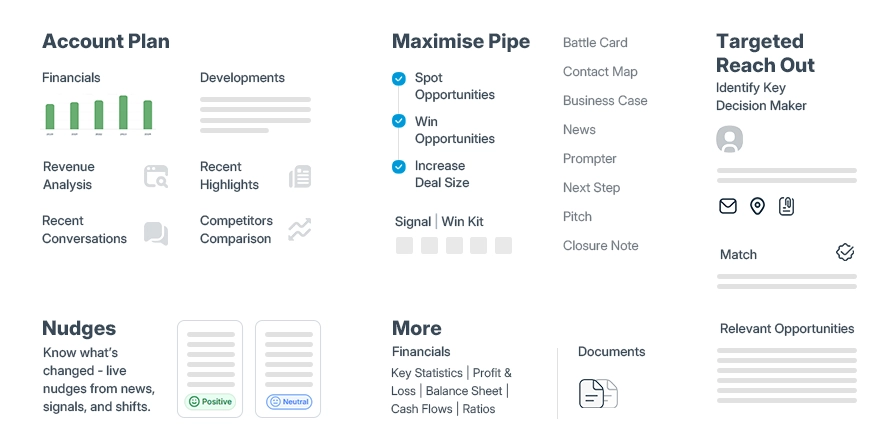
SalesPlay by MarketsandMarkets stands out as the most advanced AI-powered sales tool in 2026, though it's more accurately positioned as an AI sales intelligence platform rather than a traditional CRM. What distinguishes SalesPlay is its unique integration of market-level signals and predictive revenue intelligence that goes beyond conventional CRM capabilities.
Unlike traditional CRMs that rely solely on internal historical data, SalesPlay leverages MarketsandMarkets' extensive market research database to provide:
- Predictive revenue forecasting based on industry trends and market movements
- Real-time market intelligence that identifies emerging opportunities before competitors
- AI-driven account prioritization using external market signals combined with internal sales data
- Contextual conversation intelligence that understands industry-specific nuances and buying patterns
This positions SalesPlay not as a replacement for CRMs like Salesforce or HubSpot, but as a complementary AI layer that enhances sales effectiveness through market-aware intelligence.
Q4: Should I choose a CRM with built-in marketing features or integrate separate tools?
This depends on your needs. All-in-one platforms like HubSpot and ActiveCampaign work well when marketing and sales are tightly coupled and teams are smaller. Larger organizations with specialized needs often prefer best-of-breed approaches—dedicated CRM plus purpose-built marketing automation, using integrations to connect them. Consider team expertise, budget, and whether unified platforms actually meet both departments' needs adequately.
Q5: How important are mobile CRM apps for field sales teams?
Extremely important. Field sales reps need real-time access to customer information, the ability to log activities immediately, and mobile-optimized interfaces. Test mobile apps thoroughly during evaluation—some CRMs offer excellent web experiences but clunky mobile versions. Look for offline functionality allowing work during connectivity gaps, with automatic sync when connection returns.
Q6: What's the biggest mistake businesses make when implementing a new CRM?
The most common mistake is treating CRM as a technology project rather than a business transformation. Companies focus on features and configurations while neglecting change management, user training, and process alignment. CRM success requires cultural adoption, not just technical implementation. Involve end users early, address their concerns seriously, communicate benefits clearly, and support them throughout the transition. Technology alone never solves people problems.
Q7: What makes SalesPlay different from traditional CRMs?
SalesPlay represents a paradigm shift from traditional CRM systems by functioning as an AI-powered sales acceleration platform rather than just a customer data repository. The key differentiators include:
1. Market Intelligence Integration
- Traditional CRMs store internal customer interactions and sales history
- SalesPlay combines this with external market data, competitive intelligence, and industry trend analysis to provide a 360-degree revenue view
2. Proactive AI Guidance vs. Reactive Reporting
- Most CRMs tell you what happened; SalesPlay predicts what will happen and prescribes actions
- Real-time recommendations guide sales teams on which accounts to prioritize, when to engage, and what message will resonate
3. Revenue Intelligence Focus
- Goes beyond contact management to deliver actionable insights on deal velocity, pipeline health, and revenue predictability
- Identifies at-risk opportunities and growth signals that traditional CRMs would miss
4. Unified Workflow
- Integrates market research, AI-powered insights, and sales execution in one platform
- Eliminates the need to switch between multiple tools for research, prospecting, and engagement
In essence, while traditional CRMs are databases with automation, SalesPlay is an intelligent revenue operating system that combines external market intelligence with internal sales data to drive more informed, data-backed decisions throughout the entire sales cycle.
- How to Generate Pipeline from Existing Accounts Without Adding Headcount
- How to Nurture Leads Based on Real Buying Context
- Revenue Recognition Intelligence: Maximizing Financial Accuracy
- Account Intelligence Tools for B2B Teams: Training & Adoption
- Integrating Sales Intelligence with Existing CRM Systems


Category: Uncategorized Tags: ai, AIOps, Artificial Intelligence, cloud, cloud platform, Cybersecurity, Information and Communications Technology , VR