API Integration Guide: Connecting Sales Intelligence Tools
September 09, 2025

Are your Sales Intelligence Tools living in their own separate worlds? I've seen countless sales teams waste hours manually transferring data between systems that should be talking to each other automatically.
Connecting your sales intelligence platform to your CRM doesn't have to be a technical nightmare. With the right API integrations, you can create a seamless ecosystem where data flows exactly where it needs to go. Lead enrichment API connections can transform your sales process from fragmented to fluid, giving your team back precious hours while improving data accuracy.
In this guide, I'll walk you through everything you need to know about API integration for sales tools. We'll explore how these connections work, how to evaluate your current stack, and step-by-step instructions for setting up integrations that actually deliver results. Additionally, I'll share practical automation workflows that can immediately boost your team's efficiency.
Whether you're a technical sales operations manager or a sales leader working with IT, you'll find actionable steps to connect your tools and measure the impact on your bottom line. Let's end the data silos and create a truly connected sales tech stack!
APIs serve as the digital connectors in today's sales technology ecosystem. They function as translators between different software systems, enabling them to communicate regardless of their underlying technology. For sales teams, this connectivity is vital as it eliminates the information silos that plague many organizations.
STOP GUESSING YOUR PIPELINE
START GROWING IT WITH AI SALES!!
At their core, APIs (Application Programming Interfaces) establish pathways for data to flow between your sales intelligence tools and other critical systems. Unlike manual data transfer methods, APIs create automated bridges that ensure information moves accurately and instantly between platforms.
In sales intelligence workflows, APIs perform several crucial functions:
First, they enable real-time data synchronization across your entire sales stack. When a lead status changes in your CRM, that information immediately updates in connected systems. This synchronization ensures all team members work with the most current information, preventing outdated outreach or duplicate efforts.
Second, APIs significantly enhance data accuracy by eliminating human error in data transfer. According to research, only 30% of B2B marketers find their current customer data integration satisfactory. By replacing manual copying and pasting with automated transfers, APIs reduce errors that could otherwise lead to missed opportunities or misdirected efforts.
Third, APIs boost operational efficiency by automating repetitive tasks. Sales professionals waste nearly 4 hours each week switching between applications. API integrations reduce this time drain by providing employees the data they need within the applications they regularly use, eliminating constant platform switching.
Furthermore, APIs enable scalable data processing that manual methods simply cannot match. As your sales data grows in volume and complexity, APIs maintain consistent performance, handling everything from individual lead updates to bulk data transfers without degradation.
The practical applications of API integration in B2B sales operations are numerous and impactful:
Lead Enrichment Automation: By connecting lead generation tools with your CRM through APIs, you can automatically capture and enhance lead information. When a prospect fills out a form or engages with your content, their data instantly flows into your CRM and gets enriched with additional information from intelligence sources. This eliminates manual data entry and provides sales reps with comprehensive prospect profiles.
CRM and Intelligence Tool Synchronization: APIs create bidirectional data flows between your CRM and sales intelligence platforms. This ensures contact information, company details, and engagement history remain consistent across systems. The best sales intelligence tools connect seamlessly with your existing ecosystem through native integrations that tap into the full power of each system's API.
Automated Workflow Triggers: APIs enable sophisticated trigger-based automations. For instance, when a lead's score reaches a certain threshold in your intelligence platform, APIs can automatically assign the lead to the appropriate rep in your CRM and trigger notification workflows.
Real-time Analytics and Reporting: APIs facilitate immediate data transfer to analytics platforms, enabling up-to-the-minute reporting on sales activities and outcomes. This visibility helps sales leaders make informed decisions based on current performance rather than outdated information.
Personalized Customer Interactions: By leveraging APIs to aggregate customer data from multiple sources, sales teams can create more personalized outreach. This comprehensive view enables more relevant conversations and targeted recommendations.
Email Marketing Integration: API connections between CRM systems and email platforms enable automated campaigns triggered by specific customer behaviors or status changes. This ensures timely, relevant communication throughout the customer journey.
By implementing these API integrations thoughtfully, sales organizations can create a cohesive technology ecosystem where information flows freely, manual tasks are minimized, and sales professionals can focus on what they do best—building relationships and closing deals.
Ready to turn your Rep
INTO BEST PERFORMER ?
The foundation of successful API integration begins with a thorough audit of your existing sales tech stack. Before you can optimize connections between systems, you must first understand what you're working with and where the pain points exist.
Manual data entry creates significant bottlenecks in sales operations. Alarmingly, 72% of salespeople spend up to 60 minutes per day on manual data entry. This equates to at least an hour daily that could instead be dedicated to high-value activities like lead nurturing and sales calls.
To identify these manual transfer points in your organization:
Track time spent on administrative tasks: Measure how long team members spend copying data between systems. According to research, nearly 60% of workers estimate they could save over six hours weekly if repetitive aspects of their job were automated.
Examine error rates: The accepted manual data entry error rate is 1%, with anything higher indicating a problem. These errors directly impact your bottom line - a Goldman Sachs report estimates that manual, paper-based processing costs global businesses $2.7 trillion.
Look for process bottlenecks: Identify where deals slow down due to manual steps. Common issues include time spent researching prospects by hand, delays in answering inquiries, and inconsistent lead qualification.
Manual data entry doesn't just waste time - it actively undermines your sales intelligence. Poor data quality is responsible for an average of $15 million in losses annually. Moreover, manual processes lead to outdated information, preventing teams from capitalizing on market opportunities and making informed decisions.
Once you've identified manual transfer points, create a visual map of your current sales technology ecosystem. Start by auditing your Customer Relationship Management (CRM) system - the "memory, map, and motor" of your RevOps framework.
Evaluate your CRM on three key criteria:
Adoption: Is it actually being used or merely shelfware?
Data hygiene: Are there duplicate accounts or outdated information?
Actionability: Can users take action with one click?
Next, assess how your CRM connects with sales intelligence tools. Effective sales intelligence platforms provide several critical functions, including contact data management, lead ingestion, lead scoring, data enrichment, and analytics. The connections between these systems determine your data's accuracy and usability.
During this mapping exercise, pay close attention to integration capabilities. Review API documentation for both systems to ensure they support your specific data exchange requirements. Look for flexibility in data formats such as JSON or XML, which play a significant role in seamless integration.
It's equally important to evaluate the quality of your sales pipeline management tools. They should clearly show where momentum lives and where it leaks in your sales approach. Examine whether managers can spot aging deals and risk signals at a glance, or if representatives must navigate through multiple screens to update information.
Additionally, investigate if data silos exist in your current setup. These develop when information is kept in separate systems, making it difficult for sales teams to obtain a cohesive view of customers. Such fragmentation fundamentally reduces the usefulness of your sales intelligence and automation efforts.
The goal of this mapping exercise isn't simply documenting what exists, but identifying opportunities for integration that will deliver tangible benefits. Subsequently, you'll be positioned to select the right tools and integration methods to create a more efficient, connected sales intelligence ecosystem.

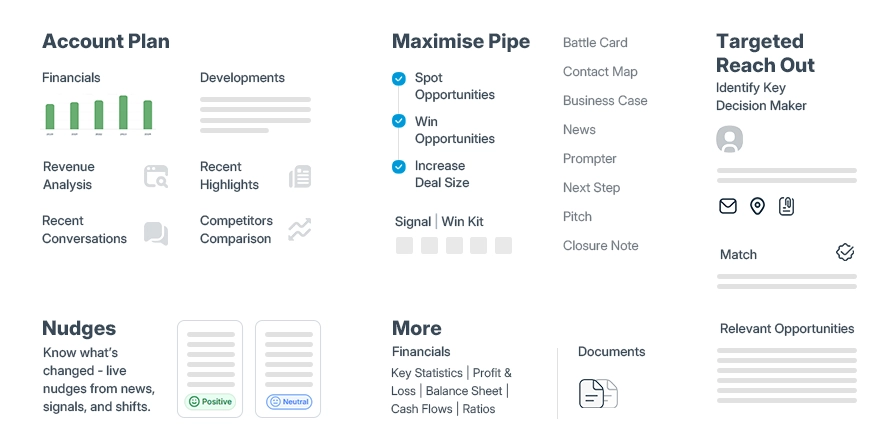
Selecting sales intelligence tools that integrate well with your existing stack requires careful evaluation against multiple criteria. Finding the right balance of features, compatibility, and support can dramatically impact how effectively your sales data flows between systems.
The quality of data directly impacts sales performance—over half of CRM managers believe their data accuracy is less than 80%. Furthermore, approximately 30% of email addresses become invalid after about a year. When evaluating potential tools, focus on these essential factors:
Data quality and coverage: Look for tools that offer accurate, current information specifically for your target markets and industries. The best platforms use rigorous verification processes that combine AI technologies with human research to maintain data accuracy.
Integration capabilities: Going back and forth between multiple tools wastes time, hampers sellers' workflows, and reduces productivity. Primarily, examine how deeply the tool connects with your CRM system. Native integrations typically offer deeper functionality since they tap into the full power of each system's API.
User adoption: Even the most powerful sales intelligence solution fails if your team doesn't use it. Choose solutions with intuitive interfaces that minimize training requirements. Quick adoption is essential for maintaining productivity—users become frustrated more easily with unfamiliar processes.
Security and compliance: Since sales intelligence tools handle extensive amounts of sensitive customer information, their security measures should be top-notch. For financial services or healthcare industries, compliance requirements are particularly stringent. Look for features like data encryption, role-based access control, and audit trails.
Customization and scalability: As your business grows, so will your need for data-driven insights. Sales benchmarks, prices, and target demographics vary depending on your niche. Rigid sales intelligence software makes it difficult or impossible to set up the customized metrics needed for your industry.
Customer support: Integrating new technology comes with challenges. Consequently, make proactive customer support a top priority. Be sure you clearly understand the vendor's support framework—24/7 customer assistance channels indicate they'll have your back whenever needed.
Several platforms stand out for their strong integration capabilities and unique features:
ZoomInfo leads the B2B data space with one of the largest and most current contact databases. Their Enterprise API allows users to integrate "the broadest, deepest and highest quality b2b data directly into any database, any system, any workflow and any application". ZoomInfo's API supports searching for and enriching company and contact records through simple HTTPS requests. It also enables large-scale data operations through asynchronous batch processes.
6sense helps you identify accounts and buyers who are actively in-market. Their AI-powered platform "highlights the accounts most likely to buy, reveals key decision-makers to connect with, and guides sellers in how to reach them". 6sense segments use AI insights and predictive modeling to surface the best accounts to pursue, making it easier to target high-value opportunities. The platform automatically imports target account lists with dynamic updates as behaviors change.
Clearbit specializes in data enrichment, offering "clean, precise, and reliable data that your B2B team needs to go-to-market". Their APIs enable companies to power their products with over 100 firmographic and technographic attributes on more than 50 million companies. Importantly, Clearbit offers real-time enrichment capabilities with "millisecond API response times" that ensure your products work as intended without overloading or slowdowns.
SalesPlay uncovers "real-time revenue shifts, ecosystem signals, and mission-critical priorities before intent data blinks". As "the world's first AI-powered sales intelligence platform," it transforms sales execution through its suite of AI agents. SalesPlay provides REST API access for key business data such as products, orders, and stock levels, enabling real-time integrations with internal systems.
The size of your team plays a significant role in choosing a platform that delivers the best ROI. Large enterprise organizations typically benefit from detailed solutions that handle complex account structures effectively, while smaller teams should focus on easy-to-implement tools instead of complex customization options.
STOP CHASING PROSPECTS
START CLOSING DEALS!!
Connecting your sales intelligence ecosystem requires choosing the right integration method for your specific needs. The approach you select fundamentally shapes how data flows between systems and impacts everything from implementation time to long-term flexibility.
Native integrations offer pre-built connections developed by software vendors themselves. These ready-to-use connections require minimal technical expertise and can typically be activated with a few clicks. Native integrations shine in their simplicity—they're designed specifically for the applications they connect, ensuring seamless functionality without complex setup procedures.
The primary advantages of native integrations include:
Rapid deployment - Quick implementation without extensive development resources
Regular updates - Ongoing maintenance handled by the vendor
Simplified troubleshooting - Direct support from the software provider
However, native integrations come with limitations. They often lack customization options, making them less suitable for unique business workflows. Furthermore, you're dependent on the vendor's development roadmap and feature priorities.
Custom API integrations offer an alternative when native options fall short. Through direct API access, developers can create tailored connections that precisely match your sales intelligence requirements. This approach provides greater flexibility and control over data flow, albeit with higher development costs and maintenance responsibilities.
Integration Platform as a Service (iPaaS) solutions bridge the gap between native and custom approaches. These cloud-based platforms provide unified environments for building and managing integrations across applications, data sources, and systems.
Zapier stands out as a popular iPaaS option, connecting over 7,000 applications through automated workflows called "Zaps". This extensive app ecosystem makes it particularly valuable for sales teams looking to automate repetitive tasks. Without Zapier, some businesses report they would need twice as many employees just to maintain their current operations.
Zapier excels at streamlining sales workflows such as:
Lead scoring and management
Opportunity updates
Pre-call research automation
Quote-to-cash processes
Workato offers another robust iPaaS solution with its "recipe"-based approach to integration. Their platform enables callable recipes—integration workflows that activate only when triggered by another recipe or REST API. This approach simplifies complex processes by breaking them into manageable components. Workato particularly shines when handling enterprise-scale integrations across marketing, sales, and customer support functions.
Middleware acts as a translator between disparate systems when direct integration isn't possible. Unlike APIs (which provide direct communication protocols), middleware is a third-party tool that supports multiple integration methods.
Consider middleware when:
Connecting legacy systems without modern API capabilities
Requiring complex data transformations between incompatible platforms
Needing centralized management of numerous integrations
Direct API calls work best for targeted, high-speed interactions requiring real-time data exchange. They offer greater granular control and typically scale horizontally—automatically adjusting to demand spikes, which is ideal for volatile sales activities.
The decision ultimately hinges on your specific requirements. If you need seamless, out-of-the-box functionality, native integrations provide the quickest path forward. For customization beyond standard offerings, custom API development offers unmatched flexibility. Meanwhile, iPaaS platforms strike a balance—offering considerable customization without extensive development resources.
Whichever method you choose, remember that the goal remains consistent: creating frictionless data flow between your sales intelligence tools and other critical systems to empower your team with accurate, timely information.
STOP GUESSING YOUR PIPELINE
START GROWING IT WITH AI SALES!!
Implementing an effective API integration requires a methodical approach to ensure your sales intelligence tools work in harmony. By following these four essential steps, you can create connections that deliver reliable data flows without unnecessary complexity.
The success of any API integration begins with clearly defined objectives. First, I identify the specific business problem the integration should solve - whether it's automating manual processes, increasing visibility, or improving team efficiency.
When setting integration goals, I consider both business and technical requirements:
Business objectives: What measurable outcomes will indicate success? Examples include reduced manual data entry time or improved lead qualification rates.
Technical requirements: Can the integration handle required data volumes? Will it meet security standards? Can it scale with business growth?
After establishing objectives, I document the intended data flow between systems. This creates a roadmap showing exactly what information should move between platforms and when. This documentation helps align stakeholders around integration expectations and prevents scope creep.
Once goals are established, the next step involves establishing secure connections between systems. This typically requires:
Obtaining API credentials: Secure appropriate API keys or tokens from each platform
Setting up development environment: Installing necessary libraries or tools specified in API documentation
Implementing authentication: Following each platform's requirements for secure access
Throughout this process, I prioritize security considerations to protect sensitive sales data. Authentication methods vary by platform - some use simple API keys while others implement more complex OAuth protocols that require token refreshing.
Data mapping forms the core of effective API integration. Initially, I create an input mapping row for every data field that needs to be transferred between systems. This process ensures data from one system correctly populates the appropriate fields in another.
The mapping process involves:
Identifying equivalent fields between systems (e.g., matching "Customer_ID" to "cust_id")
Handling format differences (dates, phone numbers, currencies)
Setting up transformations for incompatible data structures
Without proper field mapping, integrations often fail when source and destination fields have distinct names or formats. Effective mapping creates standardized relationships between your data models, enabling consistent information flow across your sales intelligence ecosystem.
Testing represents the final yet critical step before deployment. Proper validation ensures your integration performs reliably under real-world conditions. My testing approach includes:
Unit testing: Verifying individual components function as expected
Integration testing: Confirming systems exchange data correctly
Load testing: Evaluating performance under varying traffic levels
I start with simple test cases before progressing to more complex scenarios. Importantly, I pay close attention to error messages and response times during testing, as these often reveal potential issues that need addressing. Comprehensive testing should cover edge cases like network failures or invalid inputs to prevent unexpected behavior in production.
Finally, I establish ongoing monitoring to quickly identify and resolve any issues that arise after deployment. This typically includes setting up alerts for API failures and tracking data synchronization logs to maintain integration health over time.
Make Every Rep Speak
Like Your Top 1%
The shift from manual processes to automated workflows transforms how sales teams leverage their intelligence tools. By connecting your CRM with intelligence platforms through APIs, you unlock powerful automation capabilities that save time and improve data quality.
Trigger-based automation executes tasks automatically when specific conditions are met. These automations operate on an "if this, then that" principle, launching relevant actions instantly and reducing response times. For sales teams, this creates numerous opportunities:
First, customer behavior triggers can initiate personalized outreach. When prospects visit pricing pages or attend webinars, the system identifies and de-anonymizes these visitors automatically. This behavior then triggers appropriate follow-up sequences based on demonstrated interest level.
Second, deal stage changes can prompt workflow actions. For instance, when an opportunity moves to "Proposal Sent," the system can schedule follow-up tasks, update forecast categories, and alert relevant team members—all without manual intervention.
Third, communication signals can activate account-based workflows. When AI detects competitor mentions or changes in sentiment during calls, it can automatically update opportunity stages, reroute leads, or engage executive sponsors.
Lead enrichment APIs eliminate tedious manual research by automatically enhancing contact records with additional data. When implemented correctly, this automation:
Validates data accuracy by ensuring emails and phone numbers are correct
Adds critical details like job titles, company information, and social profiles
Updates records in real-time without requiring manual entry
AI-powered lead scoring takes this a step further by continuously analyzing activity across touchpoints—including website visits, email engagement, and sales interactions. Unlike traditional methods that check single conditions, AI assesses multiple dimensions simultaneously, providing a more nuanced view of prospect readiness.
This intelligence helps sales teams prioritize outreach to the most promising opportunities. Companies implementing AI-based lead scoring have seen conversion rates increase by over 10%, plus potential gains in productivity up to 35% and pipeline conversions by 56%.
Bidirectional synchronization between systems ensures everyone works from the same information. This two-way contact sync enables various critical workflows:
Keeping CRM as your single source of truth while enriching it with data from marketing automation tool
Syncing all new subscribers from marketing platforms to your CRM
Automatically updating contact details when information changes in either system
Modern integration approaches focus on native connectivity that automatically enriches CRM records, updates prospect information, and triggers workflow actions based on intelligence signals. Clay, for example, offers two-way data synchronization with CRMs—ensuring information stays current across platforms and updating daily by default.
The impact of these automated workflows is substantial. AI-powered tools like Momentum can reduce manual research tasks by up to 70% while helping boost response rates to 15–25% through customized outreach. Moreover, sales teams typically recover nearly three hours weekly previously lost to manual data entry—time better spent on selling activities.
Once your API integrations are live, consistent monitoring becomes the key to maintaining reliable data flow between your sales intelligence tools. Properly maintained connections ensure your sales team always has access to accurate, timely intelligence.
API monitoring serves as your early warning system, detecting issues before they cascade into system-wide failures. Effective alerts should be context-rich and prioritized based on business impact. First thing to remember is that alerts should provide actionable information for quick resolution, including relevant dependency data and potential remediation steps.
Consider implementing these alert types:
Performance threshold alerts that notify when API response times exceed normal parameters
Availability monitoring that checks if API endpoints and connected resources are responding correctly
Error rate notifications that trigger when failures exceed acceptable levels
The primary goal of API monitoring is reducing mean time to resolution (MTTR) for consumer-facing problems. Therefore, leverage alerting capabilities that integrate with your communication tools to ensure teams get automatically notified of concerning activity.
Thorough error logging provides critical diagnostic capabilities that dramatically speed troubleshooting and resolution. Indeed, timestamp analysis throughout the API lifecycle pinpoints exactly where delays occur in complex integrations between your sales intelligence platforms.
Prior to building dashboards, establish clear performance baselines for latency, throughput, and error rates across different traffic conditions. This approach helps you maintain accurate anomaly detection and prevents false positives that lead to alert fatigue.
Besides mechanical health checks, implement semantic monitoring that validates business logic and data quality of API responses. This ensures not just that APIs respond, but that they return semantically correct data that meets business requirements.
API versioning tracks and manages changes while communicating those changes to consumers. Unless you implement proper version control, breaking changes can lead to backward-compatibility issues, unexpected errors, and data corruption.
Still, changes are inevitable. AI algorithms can analyze API specifications to identify potential errors before they impact users. This proactive analysis helps mitigate potential disruptions before they occur.
When deprecating an API version, create a clear timeline including when support will end and when the API will be fully retired. Soon after deciding to deprecate, inform users through blog posts, email newsletters, or notifications within your developer portal. Utilize tools to monitor adoption of new versions and offer support to users who need help transitioning.
STOP GUESSING YOUR PIPELINE
START GROWING IT WITH AI SALES!!
To quantify the value of your API integrations, tracking specific performance metrics reveals their tangible impact on sales outcomes. Effective measurement provides insights into both immediate efficiency gains and long-term revenue improvements.
Lead conversion rate stands as perhaps the most telling metric for sales performance. This percentage of leads that successfully convert into customers directly measures sales process efficiency. Calculate it by dividing converted leads by total leads, then multiplying by 100. For context, average lead-to-opportunity conversion rates hover around 12% across industries.
Time savings represent another critical measurement. Companies implementing API integration typically save substantial resources by automating data collection processes that previously required manual entry. In practical terms, this means recovering nearly three hours weekly per sales rep—time better invested in actual selling activities.
Data accuracy improvements also demonstrate integration value. When data flows automatically between systems via APIs, the risk of human error essentially disappears. Additionally, real-time data collection through API connections provides a more current view of market conditions, enabling faster decision-making.
ROI dashboards bring these metrics together in one visual interface. Effective dashboards display key indicators like:
Total revenue generated divided by integration cost (expressed as percentage)
Cost per lead, opportunity, and sale
Time saved expressed in minutes, hours, and days
Modern sales dashboards consolidate data from multiple sources, presenting everything from pipeline metrics to individual performance statistics. The best dashboards enable exploration by year, segment, region, and product group for thorough analysis.
Notably, companies that implement sales intelligence effectively typically see 5-10% revenue growth with unchanged or improved margins. By tracking these key performance indicators before and after integration, you'll clearly demonstrate whether your API investments are delivering expected returns.
Throughout this guide, we've explored how API integrations transform disconnected sales intelligence tools into a unified ecosystem. APIs serve as crucial connectors that enable real-time data synchronization, enhance accuracy, and significantly boost operational efficiency. The days of manual data transfers that waste precious selling time can finally end with proper integration.
Your journey toward effective API integration starts with an honest evaluation of your current stack. After identifying those tedious manual transfer points, you can select the right tools based on data quality, compatibility, and support requirements. Tools like ZoomInfo, 6sense, Clearbit, and SalesPlay offer powerful options depending on your specific needs.
Whether you choose native integrations, custom APIs, or iPaaS platforms ultimately depends on your technical resources and customization requirements. The four-step process we examined—defining goals, authenticating connections, mapping data fields, and thorough testing—provides a clear roadmap for implementation.
Automation stands as perhaps the most valuable outcome of successful API integration. Trigger-based workflows, automatic lead enrichment, and bidirectional data syncing free your sales team from administrative burdens. This saved time translates directly into more meaningful customer interactions and closed deals.
Long-term success, however, requires vigilant monitoring and maintenance. Setting up alerts, tracking data sync logs, and properly handling API versioning ensures your integrations remain reliable over time.
The financial impact speaks for itself. Companies implementing effective sales intelligence integrations typically see 5-10% revenue growth while recovering nearly three hours weekly per sales representative. These metrics prove API integration isn't merely a technical exercise—it's a strategic advantage that directly impacts your bottom line.
Sales intelligence tools working in harmony create a sum greater than their individual parts. When data flows seamlessly between systems, your team gains a complete view of customers and opportunities, enabling faster, better-informed decisions. The result? A sales organization equipped to identify opportunities sooner, respond faster, and close deals more effectively.
Your SDRs work 9–5
AI Sales works 24/7!!
API integration of sales intelligence tools enables real-time data synchronization, improves data accuracy, boosts operational efficiency, and allows for scalable data processing. This results in time savings, reduced errors, and more informed decision-making for sales teams.
When selecting sales intelligence tools, consider factors such as data quality and coverage, integration capabilities, user adoption potential, security and compliance features, customization options, and customer support. Popular tools like ZoomInfo, 6sense, Clearbit, and SalesPlay offer various strengths depending on your specific needs.
The API integration process typically involves four main steps:
Each step is crucial for ensuring a smooth and effective integration.
Automation can be achieved through trigger-based actions, lead enrichment and scoring, and automatic contact and account data syncing. These automations can significantly reduce manual tasks, improve lead qualification, and ensure data consistency across platforms.
Key metrics to track include lead conversion rates, time saved on manual tasks, and improvements in data accuracy. Using dashboards to monitor these metrics can help you calculate the ROI of your API integration efforts and demonstrate their impact on overall sales performance.


Category: Uncategorized Tags: ai, AIOps, Artificial Intelligence, cloud, cloud platform, Cybersecurity, Information and Communications Technology , VR