Sales Automation CRM Integration: Best Practices & Setup Guide
August 28, 2025

Sales automation CRM integration poses a major challenge for businesses today. The average company uses over 1,000 apps to manage their business. Yet 70% of these apps fail to work together. This lack of connection creates inefficiencies that directly affect your profits.
Smart automation in CRM revolutionizes your sales team's operations. Companies report a 30% boost in revenue after adding an AI CRM to their stack. They also solve cases 29% faster. On top of that, CRM workflow automation takes care of repetitive tasks like data entry and follow-ups. Your team can now focus on what matters most - building relationships and closing deals. Sales reps want their automation tools to blend with their existing CRM systems - 50% consider this a priority. About 34% specifically want their meeting follow-ups automated.
This piece breaks down everything about sales automation CRM integration. You'll learn core concepts and best practices that lead to lasting success. Our simple step-by-step approach makes the complex process easier. You'll discover ways to convert more leads, improve customer communication, and boost your team's productivity.
Your CRM connected to automation tools creates a system that cuts out boring manual work and helps your sales team work better. This blend shapes modern sales operations—but what does it really mean?
Ready to turn your Rep
INTO BEST PERFORMER ?
Sales Automation CRM integration brings together two key business tools: your Customer Relationship Management (CRM) system and sales automation software. The integration links your CRM platform with other apps to sync data between them automatically. Your customer information flows naturally across your sales ecosystem through this unified system.
Sales automation is part of CRM that makes sales tasks and processes run smoother. It takes care of repeated tasks when turning leads into clients. This lets your sales team focus on building relationships and closing deals. We used automation mainly for data entry, follow-up emails, scheduling, lead management, and pipeline tracking.
The key parts of this integration include:
Centralized data management: All customer information lives in one available spot
Workflow automation: Manual tasks turn into automated processes
Lead management: Organized capture, tracking, and nurturing of leads
Process standardization: Your team follows the same sales approaches
Performance analytics: Informed insights about sales activities
Picture sales automation CRM integration as building a smart nervous system for your sales operation. Your CRM works as the central brain that holds vital information. Automation acts like reflexes that handle routine tasks without thinking.
Sales automation with CRM boosts efficiency throughout your sales process. Studies show it can increase sales productivity by up to 30%. Companies using Salesforce CRM saw their sales cycles shrink by 29%. They also spent 75% less time on manual data entry.
Time savings bring the biggest efficiency boost. Sales automation saves each sales representative about 6 hours every week on administrative tasks. CRM automation reduces administrative time by 17%. This gives more time to focus on actual selling.
These saved hours lead to real results. Teams with automation make 23% more calls each day and close deals 25% faster than others. The efficiency gains have led to 30% more monthly revenue and better customer retention rates.
The improvements show up in several areas:
Lead management becomes more organized. Your team can focus on the most promising prospects because automation captures, tracks, and nurtures leads throughout the sales cycle.
Contact management runs smoother. A central database keeps track of customer information, priorities, past interactions, and purchase history. This equips sales representatives to have better conversations.
Opportunity tracking works better. The system watches each sales opportunity's progress. This helps businesses spot bottlenecks, fix problems, and make smart decisions that keep deals moving.
Sales forecasting gets more precise. Sales teams can set realistic goals by looking at past data, market trends, and other key factors.
The benefits go beyond just numbers. About 82% of salespeople say automation gives them more time to build customer relationships. This human touch combined with tech efficiency creates a winning formula for sales success.

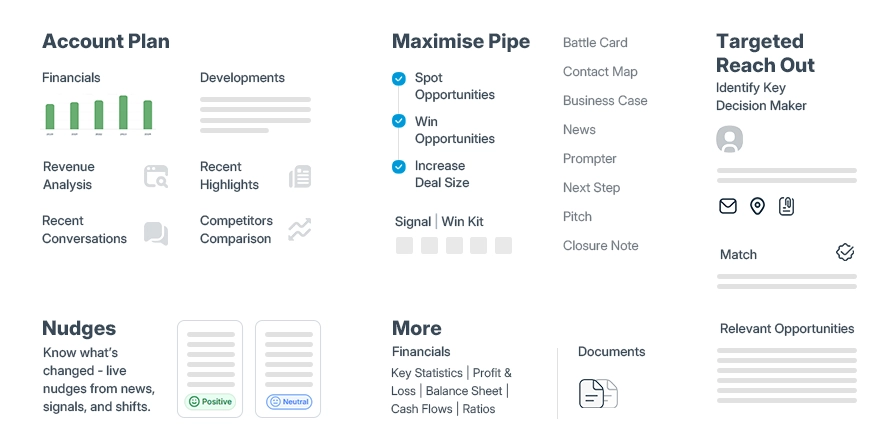
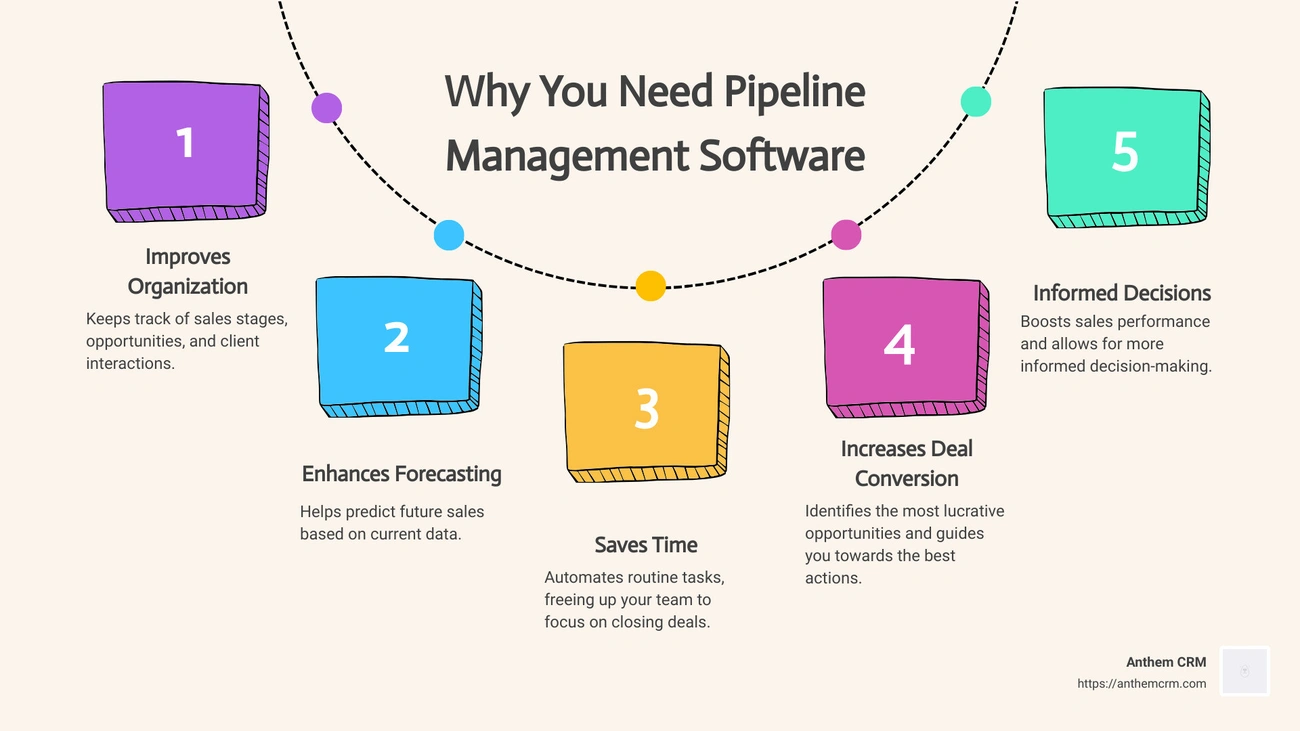
Image Source: Anthem CRM
Modern sales automation in CRM systems does way beyond simple contact management. Today's systems come with sophisticated features that reshape how your sales team works. Let's look at the features that make these platforms valuable.
Sales automation starts with capturing and qualifying leads. CRM systems analyze lead behavior automatically. They organize prospects and prioritize them before matching them with the right sales representative. Software completes this process in minutes, unlike humans who would need countless hours.
Modern CRMs use AI-driven qualification features to highlight promising leads and opportunities. Your team can participate with customers in relevant and productive ways. These systems tap into the full potential of constantly updated online data. They perform research using public information to find new potential customers.
The system creates new contact profiles automatically when promising leads interact with your marketing materials. Their information stays in your CRM for teams of all sizes to access. The system qualifies captured leads through standardized processes. These processes identify time frame, budget, and purchase processes.
Email sequences are the foundations of sales automation. These emails go out automatically to leads or prospects based on specific triggers. Research shows email marketing gives a $36 return for every $1 spent. We achieved this through segmentation, personalization, and automation.
Automated emails show impressive performance metrics. Customer behavior-triggered emails have substantially higher open rates (35.64%) and click-through rates (5.31%) compared to standard campaigns. McKinsey's research shows companies that use personalization in marketing campaigns earn 40% more revenue than competitors.
These sequences serve multiple purposes across the sales cycle:
Welcoming new prospects
Nurturing leads with educational content
Converting sales-ready prospects
Re-engaging disengaged customers
Reminding customers about abandoned carts (which have a 39.07% open rate)
Sales automation reduces administrative work through automated task management. The system tracks emails, meetings, and phone calls automatically. This gives everyone a clear view of how reps progress with each lead.
Task automation prevents missed opportunities by setting timely reminders for important actions. To cite an instance, these systems schedule follow-ups with reminders that go straight to your calendar or email. Creating contacts, scheduling meetings, creating appointment reminders, and arranging service calls work best with automation.
The system's reminder timing customization proves valuable. Sales managers can set reminders for routine actions like monthly check-ins while the CRM handles scheduling. The reminders adapt to different team members based on their roles.
STOP CHASING PROSPECTS
START CLOSING DEALS!!
Pipeline stage automation marks a big step forward in sales process management. You can set up automations that control stage transitions and take actions automatically when deals reach specific stages.
The system sends quote emails automatically when deals enter the "Proposal" stage. It creates tasks or sends internal notifications when deal stages change. These automations update sales pipeline stages as deals move forward. Sales teams can focus on closing deals instead of managing data.
This automation brings real results. The CRM updates pipeline information in up-to-the-minute data analysis. This ensures accuracy and lets your team focus on activities that generate revenue. Your sales pipeline becomes more visible and controllable.
Sales forecasting remains one of the most wanted CRM features. About 43% of companies say forecasting and pipeline visibility are their most important CRM activities.
Modern CRM systems make use of predictive analytics and AI to create accurate forecasts, even with incomplete data. They study your historical deal data and connect it to CRM opportunities. This builds robust sales forecasting processes. You can create monthly, quarterly, or other estimates quickly.
Advanced systems give you multiple forecasting choices. Zoho CRM helps build different conditional forecasts for various forecast periods. AI analyzes your past forecasting and performance data to suggest accurate targets for your business. Sales managers can spot weak points, improve forecast accuracy, and make better decisions with a comprehensive view of sales data.
Sales automation combined with your CRM brings major benefits beyond simple efficiency gains. Companies that use these systems see big improvements in how their sales teams work. Here's a look at the main advantages that make this combination vital for modern sales teams.
Combining sales automation with your CRM creates one reliable source for all customer information. This setup removes data barriers that used to limit how teams worked together. Your team can find consistent customer data quickly instead of searching through multiple systems or spreadsheets. This saves a lot of time previously spent on manual tasks.
The practical results are clear:
Improved data consistency – Automation records information correctly from the start and prevents duplicate or wrong entries
Immediate updates – Customer profiles stay up-to-date for marketing, sales, and service teams
Complete visibility – Teams see all customer interactions and make better decisions
The biggest advantage is how centralized data helps sales, marketing, and support teams work naturally together. This creates a smooth customer trip. Everyone works with the same accurate, current information.
Automation makes lead nurturing much more efficient. Your sales team can connect with many prospects at once by using automated sequences. The system sends relevant messages based on what leads do. This steady nurturing turns more prospects into customers without constant manual work.
The system works on "trigger-based" actions—automatic responses that happen when prospects take specific steps like filling out forms or clicking email links. These triggers send targeted messages that guide potential buyers through their trip.
Benefits show up throughout the sales cycle. A good example shows how marketing automation spots which communication channels your leads use most. Of course, this knowledge helps create better outreach plans. The automation tools also show what your audience wants, helping you focus on actions that bring results.
Sales automation offers immediate insights and reports that help your team make smart, data-backed decisions. Sales leaders don't wait for manual reports - they see important metrics right away. This helps them spot what works and what needs to change.
The forecasting tools are especially useful. These tools use past data to spot current trends and predict sales results. AI can create accurate forecasts even with incomplete data. This predictive power helps identify patterns in how customers behave, measure if strategies work, and project future revenue more accurately.
These insights create real advantages. Sales managers can spot which team members need coaching to reach their goals. Sales teams can also adjust their approach based on new trends.
Integration helps create more personal, timely customer interactions. Automated messages keep communication steady throughout the buying trip and keep customers involved and informed. Quick responses to questions show customers you care about their needs.
Personal attention makes a big difference. Automation helps businesses create custom interactions through product suggestions, targeted messages, and personalized emails based on what customers like. The results speak for themselves—companies that use personalization in marketing earn 40% more than their competitors.
The system can also reach out proactively. It alerts customers about order status, upcoming renewals, or possible issues before they happen. This proactive approach, combined with reliable experiences at every touchpoint, builds trust and promotes customer loyalty.
Make Every Rep Speak
Like Your Top 1%
Businesses must deal with several challenges while implementing sales automation CRM, despite its many benefits. A clear strategy and deep understanding of these obstacles will lead to successful integration.
Security risks increase when CRM systems connect with other applications. These systems become prime targets for data breaches because they hold sensitive customer information. The expanded access makes it harder to comply with GDPR or CCPA regulations.
Data breaches cost companies USD 4.45 million on average in 2024. Companies save USD 1.55 million in breach-related costs by using automated security technologies.
Your system needs these security measures:
Encryption for data both in transit and at rest
Multi-factor authentication (MFA) as your first defense line
Role-based access control (RBAC) to restrict user permissions based on job roles
Regular security audits of integration points are necessary. You should also keep detailed audit trails of data access and changes. Companies need to find the sweet spot between tight security and the efficiency that CRM integration promises.
Employee resistance to new workflows can derail even well-planned CRM projects. Most employees worry about losing their jobs or getting more work without clear advantages.
A detailed change management strategy helps overcome this challenge. Clear communication about the integrated system's benefits should come first. Show employees how automation will make their work easier and boost productivity rather than replace them.
Well-laid-out training programs help smooth this transition. These should mix role-specific sessions about daily tasks, hands-on workshops, and self-help resources. A step-by-step rollout helps by:
Testing with a pilot group to spot issues early
Making system improvements based on first feedback
Building trust through small victories
Department-level change champions provide peer support and help their colleagues adopt the system.
CRM systems must connect with various business apps, each with its own data structures and APIs. Companies have integrated only 28% of their apps on average, while 81% of IT leaders say disconnected systems block their digital progress.
Different systems store and show data in their own ways, which creates problems. Start by mapping out which systems need CRM connection, what data they should share, and how often they need updates.
Integration platforms with ready-made connectors for common CRM and business apps can reduce technical hurdles. These cloud platforms give you central integration control, automatic data exchange, and instant syncing.
Good API management helps handle complex integrations. API gateways standardize system communication, control versions and dependencies, and apply security rules consistently. Middleware solutions help transform data between systems and keep them loosely connected for easier updates.
Sales automation in your CRM needs a step-by-step approach to succeed. This guide will help you direct the integration process and get the most from your investment.
Your first task is to set clear objectives for your sales automation CRM integration. Companies that set defined automation goals see 30% more successful implementations. Start by spotting specific problems in your current sales process:
Time-wasting activities: Find which repetitive tasks eat up your team's time
Error-prone processes: Spot where manual data entry creates the most mistakes
Sales bottlenecks: Find stages where leads often get stuck in your pipeline
Talk to department heads to learn about operational challenges. Your CRM automation goals should be specific - whether you want a shorter sales cycle, better lead qualification, or improved customer follow-up. Start with areas where your current process needs the most help.
The right sales automation tools make a significant difference in your long-term success. Take time to review if potential platforms match your sales process. Think about whether your business mainly uses inbound marketing or needs to scale across channels.
Don't get distracted by fancy features. Your automation tools must work naturally with your current CRM. Focus on features that directly help you reach the sales goals you set earlier.
Key points to think about:
Easy-to-use interface that your team can quickly learn
Room to grow as your business expands
The vendor's track record and support quality
Not sure which solution fits best? Request a Demo today! Most reliable vendors let you test their platforms before buying.
Your SDRs work 9–5
AI Sales works 24/7!!
Data quality makes or breaks your integration success. Bad data quality increases costs and slows down about 40% of all data migration projects. The smart move is to do data cleansing before migration. Cleaning data after migration takes much more work.
Your data cleansing should cover:
Scope definition: Pick which data needs cleaning based on your analysis
Field mapping: Match fields between your old and new systems
Value mapping: Adjust values to work with your target system
Address cleansing: Fix and standardize addresses
Duplicate checking: Find and remove duplicate records
Clean data before CRM import prevents future problems. This step matters because 91% of companies say incorrect customer data affects their revenue.
After data preparation, start building automated workflows in your CRM. Pick one or two key workflows to begin with instead of automating everything at once. This approach makes testing and learning easier and won't overwhelm your team.
Be strategic with your workflow setup. Create triggers based on specific events like form submissions or pipeline changes. Then set up automatic actions for your CRM to perform, such as lead assignments or follow-up emails.
Keep an eye on results through your CRM's analytics. Check dashboards often to see what works well and what needs fixes. Ask your team about their experience with the new tools and use their feedback to make things better.
Test your automation setup fully before rolling it out. Use a sandbox environment first to find and fix issues safely.
Watch out for:
Data syncing between systems
Workflow automation performance
User access and permissions
System behavior under different conditions
Set up strong monitoring during migration and check data accuracy regularly. Automated testing tools can help with this task.
Keep backups of your current data before migration just in case. Give your team proper training and support so they know how to use the integrated system and keep data clean.
Your sales automation CRM needs more than proper implementation to achieve lasting success. A smart strategy ensures your system delivers value well beyond the original setup.
The temptation to automate everything right away is strong. Start by automating just one or two processes before you expand. Your team adapts better this way without feeling stressed. Many successful teams focus on specific parts of their sales cycle before they add more automated workflows.
Step-by-step adoption helps your team build confidence. You can spot and fix problems early too. This approach reduces disruptions and builds strong foundations for future improvements.
Bad data costs businesses about $700 billion each year—or 30% of a company's average revenue. Sales teams spend 21% of their time looking up incomplete information.
A typical customer database has all but one of these contacts incomplete. About 20% of records are useless—74% need updates and over 25% are duplicates. Regular data audits help confirm records and find quality issues.
Data quality should be everyone's job, not just IT's responsibility. The costs of bad data drop when teams understand that accurate data supports business goals.
Detailed training boosts CRM adoption rates. Use a mix of virtual, in-person, solo, and group learning methods. Good programs need 3-6 months to show full benefits through practice, feedback, and reinforcement.
Teams need to understand why these tools matter, not just how to use them. Show them how automation makes their work easier. This helps get their support and reduces resistance to change.
Set up performance indicators that match your company's goals and check them often. Sales numbers give vital insights into team success and business health.
Think about tracking:
Sales quota attainment and win rates
Average deal size and lead conversion rates
Forecast accuracy
Most CRMs have dashboards you can customize for immediate insights without extra work. These analytics help you find problems early. This lets you make informed choices to keep your sales process running smoothly.
The right tools play a vital role in successful sales automation integration. Here are four powerful platforms that can transform your sales process.
SalesPlay is the world's first AI-powered sales intelligence platform that transforms sales execution speed and precision through its revolutionary suite of 7 AI Agents. Unlike competitors offering fragmented data, SalesPlay delivers pitch-ready opportunity ecosystems—hyper-personalized sales kits, mapped buying centers, and conversion-ready outreach sequences that eliminate 80% of manual work while consistently closing deals others can't identify. Built on exclusive MarketsandMarkets intelligence and thousands of premium data sources, and exclusive vendor partnerships, the platform creates a competitive moat that drives 3x productivity gains by enabling every rep to execute with the precision of your organization's elite performers.
HubSpot CRM serves as a complete platform at the heart of your sales automation ecosystem. This tool provides free CRM with contact and deal tracking plus powerful automation capabilities. HubSpot helps you scale lead outreach through personalized email sequences and uses workflows to rotate leads, create deals, and automate tasks. The platform measures and optimizes outreach with outcome reports and A/B tests. Paid plans start from USD 45.00 per user/month, while a free version comes with limited automation features.
Zoho CRM provides strong sales automation through workflow rules that handle operational and data entry tasks. The platform routes leads automatically based on customizable criteria like zip code, product interest, or lead score. Its forecasting tools analyze CRM data for past and current sales trends to give accurate sales predictions. Teams can close deals on the go with Zoho's mobile app. Plans begin at USD 12.00 per user/month.
Pipedrive's visual pipeline management works great for small and medium-sized businesses. The platform's automation features keep deals on track by handling repetitive sales tasks. Its Smart Contact Data feature gathers web data from sources like LinkedIn and Google with one click to help pre-qualify leads. Pipedrive's plans start at USD 14.90 per user/month.
Scratchpad works as an AI-driven Salesforce add-on that improves CRM hygiene by simplifying pipeline management. Its AI Sales Assistant watches virtual sales calls and updates Salesforce with important details automatically. Sales reps get daily to-do lists so they never miss following up on leads. Users rate it highly with 4.8/5 stars on G2 based on over 1,400 reviews. You can start with a free plan, while paid options begin at USD 19.00 per user/month.
Sales teams face a tough challenge when they try to balance efficiency and individual-specific experiences in their sales automation CRM. The right balance will give customers a sense of value instead of feeling like just another number.
Your path to better personalization starts with smart audience segmentation. Breaking down customers into groups that share common traits, behaviors, or priorities helps create targeted automated messages. Companies that segment their audiences see 10-20% higher revenue and boost conversions by up to 50%. You can group customers by:
Demographics (age, job title)
Behavior patterns (purchase history, website activity)
Lifecycle position (their place in the buying trip)
Dynamic content changes generic messages into tailored experiences. Your content sections, CTAs, and recommendations adapt based on each person's data. Email campaigns using dynamic content have boosted revenue by 174%. AI looks at customer data and suggests products and marketing messages that line up with each person's interests.
Your automation might be smart, but nothing beats human interaction. Studies show 30-35% of client interactions need to focus on non-sales activities. Smart teams let automation handle routine tasks and save human contact for complex situations that need empathy or careful handling. This mix improves efficiency while keeping those personal connections that drive sales.
Sales automation CRM integration revolutionizes how modern sales teams work and grow. This piece shows how proper automation can boost revenue by 30% and reduce administrative work. Your team can then focus on what matters most—building meaningful customer relationships.
A successful integration needs careful planning and execution. Clear objectives before tool selection will ensure your automation meets specific business needs instead of adding complexity. Clean, accurate information forms the foundation of successful implementation that drives better decisions and customer experiences.
Small steps in automation work best. Teams build confidence through manageable changes while identifying improvements before scaling up. This step-by-step approach combined with regular training and performance tracking creates lasting success rather than short-term gains.
Tools play a vital role in the process. HubSpot, Zoho, Pipedrive, or Scratchpad each offers powerful features to streamline your sales processes based on your needs. These platforms help balance efficiency with personalization—they automate routine tasks while keeping meaningful human connections intact.
Sales automation CRM integration gives sales teams exactly what they need: more selling time, less administrative work, and better customer insights. Companies that embrace this approach gain competitive advantages through faster sales cycles, better lead management, and informed decision making. Your sales team needs these tools to succeed in today's ever-changing business environment.
Sales automation CRM integration transforms how sales teams operate by eliminating manual tasks and creating unified customer data systems. Here are the essential insights for successful implementation:
• Start with clear goals and clean data - Define specific objectives before implementation and ensure data quality, as poor data costs businesses 30% of revenue annually.
• Begin small and scale gradually - Automate one or two processes initially rather than everything at once to build team confidence and identify issues early.
• Balance automation with human connection - Use automation for routine tasks while preserving personal touchpoints for complex situations requiring empathy and relationship-building.
• Choose integration-compatible tools - Select platforms like HubSpot, Zoho, or Pipedrive that seamlessly connect with existing systems and align with your sales process.
• Monitor performance and provide ongoing training - Track key metrics regularly and invest in comprehensive team training to ensure long-term adoption and success.
Companies implementing sales automation CRM integration report 30% revenue increases, 29% faster case resolution, and 6 hours per week saved per sales representative. The key to success lies in strategic implementation that enhances rather than replaces human expertise, creating a powerful combination of technological efficiency and personal relationship-building that drives sustainable sales growth.
Integrating sales automation with CRM centralizes customer data, improves lead nurturing, enables faster decision-making through real-time analytics, and enhances the overall customer experience through personalized interactions and proactive communication.
To overcome resistance, establish clear communication about the benefits, emphasize how automation will simplify work rather than replace employees, provide comprehensive role-specific training, and consider a phased rollout approach to build confidence through small wins.
Start small and scale gradually, ensure ongoing data quality through regular audits, provide continuous training to your team, and consistently track performance metrics to identify areas for improvement and optimization.
When selecting tools, prioritize compatibility with your existing systems, focus on features that directly address your specific sales goals, consider ease of use and scalability, and evaluate vendor reputation and support quality. Many vendors offer trial periods to test their platforms before purchasing.
To personalize without over-automating, segment your audience based on shared characteristics, use dynamic content in communications, and balance automation with human touchpoints. Reserve about 30-35% of client interactions for non-sales related, personalized engagement to maintain meaningful connections.


Category: Uncategorized Tags: ai, AIOps, Artificial Intelligence, cloud, cloud platform, Cybersecurity, Information and Communications Technology , VR