Sales Automation System Setup Complete Implementation Guide
August 28, 2025

Sales automation has become essential for teams buried in paperwork. The numbers tell a surprising story: sales reps spend just 28% of their week selling. Even more concerning, 90% of sales managers lose at least 15 hours weekly on admin tasks outside their core responsibilities. This gap hurts both revenue and business growth.
Sales automation provides a practical fix to this challenge. Companies can automate about 33% of their sales tasks with a strong automation system. This includes everything from prospecting to email templates and reporting. Teams save an average of 2.15 hours daily with automated sales software, according to HubSpot's 2024 Sales Trends Report. They can now focus this extra time on activities that generate revenue.
This detailed guide will show you how to create a sales automation system that delivers real results in 2025. You'll learn which tasks need automation first, how to pick the right tools, and ways to create workflows that work. The guide helps both newcomers and experienced users build systems that optimize efficiency. Your customers will still get the personal attention they deserve while you retain control of the process.
The sales landscape has reached a critical turning point in 2025. Economic uncertainty, inflation, and technological disruption have created a perfect storm that forces sales teams to face unprecedented challenges. Sales process automation isn't just an advantage anymore—it has become essential to survive in this environment.
Ready to turn your Rep
INTO BEST PERFORMER ?
Numbers paint a clear picture about why manual sales processes can't sustain anymore. Sales representatives spend only 30% of their workweek on actual selling, while administrative tasks, data entry, and follow-ups consume the other 70%. This poor use of time explains why companies move quickly toward automation.
Sales teams face a "momentum problem" with manual processes. Representatives lose focus and energy when buried in backend busywork—exactly when they should build pipeline and close deals. Manual data entry also brings high error risks, with research that indicates error rates of about 25% in hand-recorded data.
So, the global market for sales automation mirrors this change, with expected growth from USD 7.80 billion in 2019 to USD 16.00 billion by 2025. Another projection suggests an even higher figure, estimating the global market will hit USD 19.50 billion by 2030.
Sales automation itself has grown and changed. Simple templates and rigid rule-based systems have evolved into intelligent, adaptive workflows. Today's best sales automation systems go beyond simple efficiency tools to become complete platforms that:
Save 5 hours weekly by automating routine tasks
Cut human errors by 20% through automated processes
Boost ROI by 10-20% for companies using automation technology
On top of that, this development shows real results. Teams that use AI-driven automation tools see a 33% boost in overall efficiency, and organizations with automation achieve a 27% higher close rate on average.
Sales automation tackles the productivity bottleneck that holds back growth. Teams that automate repetitive tasks free up valuable time for relationship-building and strategic activities. This change brings major benefits for business expansion.
Automation helps companies scale operations smoothly. Growing organizations can handle larger volumes of leads and customers without adding more sales staff. This increased efficiency proves especially valuable when skilled workers are hard to find.
Automation brings flexibility too. Analytical insights from automation help companies expand into new markets and introduce new product lines. Growing businesses can handle complex workflows, multi-stage approvals, and product configurations with advanced sales automation.
The business case for automation makes sense. Companies that use sales process automation report 15 to 20 percent better productivity. Automated sales systems also speed up sales cycles by 8 to 12 percent. Maybe even more important, businesses using automation see lead conversion rates jump from 10-15% to between 20 and 30%, while revenue grows by about 29%.
Beyond money, automation makes teams happier. The mental impact stands out—76% of sales representatives say automation reduces work stress by eliminating boring administrative tasks. Better work environments lead to happier employees who stay longer.
Digital channels will handle 80% of all B2B sales interactions by late 2025. Companies that don't adapt risk falling behind competitors who use cutting-edge tools to sell smarter and faster. With 74% of sales professionals expecting AI to reshape their roles, automation has become the new standard, not just a nice-to-have feature.

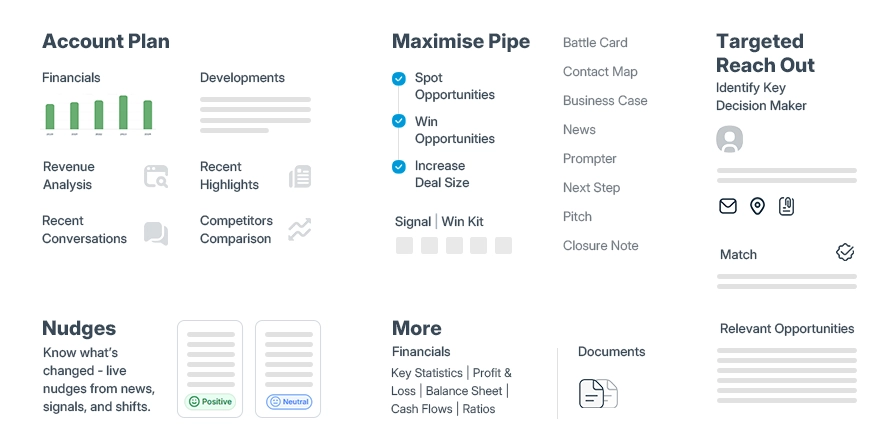
Sales teams now work in a data-rich environment where manual processes can't keep up. The sales automation process helps teams use technology to handle time-consuming tasks. This approach cuts down on manual work and mistakes while making teams more productive. Learning how this process works will help you build a system that gets real results.
The numbers tell an interesting story. About one-third of all sales and operations tasks can be automated with current technology. Yet only one in four companies have automated at least one sales process. Sales professionals waste 70% of their time on tasks that aren't selling. This presents a great chance to boost productivity through automation.
These tasks work best with automation in sales:
Lead management: AI-powered tools score, qualify, and distribute leads based on specific criteria. This helps sales reps focus on valuable prospects
Data capture and enrichment: Your system can pull relevant information from emails and update deal records
Communication: Automated systems handle routine outreach like email sequences and appointment scheduling without human help
Administrative tasks: Your CRM updates, call logs, and report generation can run automatically
Pipeline management: AI analyzes opportunities and predicts the best actions to push deals forward
Companies that use sales process automation see impressive results. They cut overall costs by 10-15% and reduce order processing time from days to hours.
A sales automation system relies on workflows as its foundation. These preset steps run automatically when specific conditions occur. Each workflow can assign leads, update their status, send outreach messages, and create follow-up tasks.
Triggers kick these workflows into action. A workflow might start when someone fills out a form, checks your pricing page, or hits a certain lead score. The system then runs through its preset actions without needing human input.
Modern sales automation tools use simple logic. Your system might assign a call task to a sales rep if someone opens an email three times. It can also start a follow-up sequence if a lead hasn't responded within a set time.
Your workflows can include delays, scheduling windows, and user assignments that feel natural. This makes sure your communication doesn't sound robotic.
AI has opened new possibilities for automated sales software. Modern AI tools do more than follow rules - they give smart insights and take action.
AI sales assistant software handles data analysis that would overwhelm humans. JP Morgan showed amazing results when they used AI to analyze email campaigns and write new copy. Their click-through rates jumped by 450%.
AI transforms sales systems in several ways:
Natural language processing lets AI chat naturally with humans
AI analytics finds patterns in customer data to make better sales predictions
Generative AI creates emails, sales pitches, and reports based on past customer information
Sales teams using AI Sales Tools see impressive results. Enterprise salespeople can handle twice as many accounts and win 30% more deals. These tools don't replace humans - they make sales teams better by finding insights, suggesting actions, and handling routine work.
The future looks bright as AI and automation reshape sales processes. We'll see smaller but more effective "Navy SEAL" sales teams spending 80% of their time talking to customers.
STOP CHASING PROSPECTS
START CLOSING DEALS!!
Picking the right sales automation system means looking at key features that drive real business results. The market offers many options, and knowing which capabilities matter can make or break your automation efforts.
A solid sales automation in CRM starts with smooth integration between your customer relationship management system and other apps. This setup connects different platforms and syncs data automatically to give you a complete view of customer information.
Good CRM integration brings major benefits:
Teams work better together across departments
Operations run smoother with less manual data entry
Data stays more accurate with live updates
Customers get better service through consistent information
Sales teams struggle with awkward workflows when systems don't connect - they must log into multiple platforms and switch between them to find data. Your sales automation tools should connect straight to your CRM so information flows both ways and stays in sync without manual work.
Email automation stands out as a key part of any automated sales software. Teams can create personal outreach emails, drip campaigns, and follow-up sequences that guide leads through the sales funnel.
The numbers show how well email automation works - triggered emails see 70.5% higher open rates and 152% higher click-through rates than regular newsletters. About 34% of teams use sales automation to handle meeting follow-ups automatically.
Top email automation features should let you:
Build personal sequences based on customer actions
Set up follow-ups that match lead behavior
Use content that changes based on recipient data
See what works to improve future messages
AI has changed what sales automation can do. Modern AI systems look at huge amounts of data to predict customer behavior and suggest next steps.
This means AI helps by:
Scoring leads to spot the best prospects
Using data to forecast customer actions
Suggesting personalized messages based on past talks
Recommending products and prices that fit each customer
AI-driven automation helps sales teams handle twice as many accounts while winning 30% more deals. These systems connect all parts of the sales process and help them work better together.
Mobile access has become essential for sales automation tools in today's ever-changing business world. Good mobile sales apps give quick access to important details like customer profiles, what they've bought, and ongoing talks.
Sales reps with mobile access can:
Answer customer questions faster
Make smarter decisions right away
Give personal recommendations on the spot
Update leads and log conversations instantly
Mobile sales apps should bring all data together and work smoothly with your main CRM system. Look for apps that work offline too, so teams can keep working without internet.
The best mobile features include accessible interfaces, instant alerts, and task management that keeps your team organized no matter where they work. Access to sales activities from anywhere gives reps a clear edge in busy sales environments.
Make Every Rep Speak
Like Your Top 1%
Building a successful sales automation system needs a structured approach instead of jumping into implementation right away. Doing this helps you create a system that works for your team's specific needs and brings measurable results.
The base of good automation in sales starts with knowing your current sales process. Take time to review each activity from lead generation to closing. You can spot tasks that are repetitive and time-consuming which you could automate.
Start by talking directly with your sales team through interviews or surveys to find which parts of their jobs need automation. Your sales reps know which tasks slow them down—their feedback is a great way to get valuable insights. Research what other companies in your field are doing well with automation.
Pick one or two tasks that take up lots of time and are easy to automate. This focused method helps avoid trying to automate everything at the same time. Companies that use sales process automation wisely have cut costs by 10-15%. Their order processing now takes hours instead of days.
Your search for sales automation tools should start with clear goals. What do you want to achieve? Set specific key performance indicators (KPIs) to track your progress. Let these goals guide your search.
Look for tools that combine smoothly with your current tech stack, especially your CRM. The way tools work together is vital—separate systems waste time and miss important data. The ease of use matters too, since complex tools often go unused.
Test the software with your team using free trials or demo accounts before you decide. Think about growth—pick adaptable solutions that can expand with your business.
?? Boost Your Sales Today by picking tools that fix real problems instead of covering up bigger issues. The right automation platform will give your team more time while fixing core problems in your sales process.
After picking your tools, you need to create workflows for your sales automation system. Map out every step from prospecting to closing. Each stage needs specific automations to make the process faster.
Good workflows have actions that start when certain things happen. These triggers might be a prospect filling out a form, checking your pricing page, or reaching a certain lead score. You'll need to set both the triggers and what happens next for each workflow.
HubSpot users can build workflows from scratch or use templates that match their goals. While setting up, think about whether contacts should enter workflows again when they meet the criteria.
Focus on workflows that remove repetitive work. Data shows that good automation helps sales teams handle twice as many accounts and boost win rates by 30%.
The best automated sales software only works when your team knows how to use it. Show your sales reps how to set up automation for their accounts. Share any video tutorials or courses your tools provide.
Schedule a meeting to explain the new automated sales process. Show your team how these changes will improve their daily work and let them focus on what matters most. This approach helps get your team excited about the changes instead of resisting them.
Training should happen regularly. Check tool usage weekly to see which solutions your reps like and where they need help. Use this information to plan more training or make changes.
Make training practical—do it with the tools your team uses daily. Share success stories to build excitement and find team champions. Get feedback often to improve your automation flows and make sure they help your team work better.
AI Sales tools make the difference between top-performing sales teams and those struggling to keep up. Recent advances have pushed these intelligent systems beyond simple automation. They now deliver measurable improvements throughout the sales cycle.
Sales teams often struggle to identify which leads need immediate attention. AI solves this problem by analyzing huge datasets to spot patterns in successful conversions. A recent survey shows 98% of sales teams believe AI improves their lead prioritization by a lot. This overwhelming agreement emphasizes how AI transforms lead scoring.
AI lead scoring works by:
Looking at behavioral patterns in website visits, email engagement, and social media interactions
Automatically assigning scores based on conversion likelihood
Flagging leads most likely to convert with AI-driven recommendations
Enriching lead data from external sources to create clearer prospect profiles
Sales representatives can manage twice as many accounts with this scientific approach to lead qualification. They also see up to 30% higher win rates. Your team can focus on prospects with genuine buying intent instead of wasting time on cold leads.
Perfect timing and customized follow-up communications can make or break a deal. AI-powered automation gives teams an edge by figuring out the best times and ways to reach prospects.
?? Boost Your Sales Today with AI-driven follow-up systems that analyze user behavior and send perfectly timed messages. These smart tools get better over time. They identify the best engagement patterns and balance communication frequency to keep potential customers interested.
Automated follow-up systems offer key benefits:
Quick response times with instant follow-up messages
Steady engagement without manual work
Increased efficiency by saving hours on email drafting
Easy scaling to handle more leads without hiring
Results speak for themselves. Triggered emails see 70.5% higher open rates and 152% higher click-through rates than regular newsletters. Well-planned follow-up sequences create consistent, customized communication delivered strategically over time.
Your SDRs work 9–5
AI Sales works 24/7!!
Old forecasting methods can't handle big, complex datasets and rely too much on gut feelings. AI-driven predictive analytics uses machine learning algorithms to spot patterns in historical data and predict future outcomes accurately.
Industry experts predict that by 2026, 85% of workers will use AI recommendations to make evidence-based decisions immediately. This fundamental change toward predictive intelligence shows real results. More than half (52%) of C-suite leaders report measurable improvements from AI-powered workflows.
Predictive analytics helps with:
Pipeline analysis that spots problems in the sales process
Deal predictions showing which opportunities will likely close
Early warning signs of stalled deals to avoid wasting time
Immediate sales forecasts that adjust to market changes
Sales managers can quickly spot pipeline problems like prospect shortages or deal backlogs. This leads to faster decisions about pipeline health. Predictive analytics gives teams the insight to use resources wisely and focus on deals most likely to succeed.
CRM and sales automation create a powerful partnership that removes inefficiencies in your organization. Your employees lose an average of 12 hours weekly just searching for information because of data silos.
Sales automation in CRM gives you several advantages that go beyond what each system can do alone:
Better teamwork: Teams can work together smoothly as the integration connects departments. Sales and marketing share customer insights easily
Two-way data flow: Bidirectional synchronization updates changes instantly between systems
Efficient processes: Teams can focus on closing deals instead of paperwork because automation removes duplicate tasks
Complete customer picture: Every team member sees the same information about customer interests, purchases, and interactions
Companies that arrange their sales and marketing operations grow revenue 24% faster. Their profits also increase 27% faster over three years. This growth comes directly from good CRM integration.
You should first decide which data needs to flow between systems. Most companies sync their contacts, leads, accounts, and opportunities. The next step is to map fields correctly so automation tool data matches the right CRM fields.
A good sales automation system needs true two-way synchronization. Changes made anywhere automatically update across all platforms, unlike one-way transfers. Marketing, sales, and service departments always see current customer profiles.
Cloud platforms provide the easiest way to connect different systems. Teams can access all their needed information in one place, which helps them work better and make smarter decisions.
Data silos block sales progress and prevent you from using your CRM effectively. Teams can't make informed decisions because they can't access vital customer insights in these isolated information pockets.
Rules that detect duplicates for your key record types help curb this issue. These rules find and combine records that have similar information to keep data clean across your sales automation tools.
People sometimes create data silos because they don't want to share information they know well. Clear communication about CRM integration benefits helps solve this. A culture that encourages data sharing removes barriers between teams and lets everyone use information well.
The right measurements are the foundations of any successful sales automation strategy. Your team needs to track proper metrics to determine if your automation in sales improves performance or just creates digital busywork.
Lead response time shows how fast your team connects with new leads after they show interest. Teams that respond within five minutes are 21 times more likely to qualify a prospect than those who wait 30 minutes. Notwithstanding that, businesses take about 42 hours on average to respond across industries.
Research shows 78% of customers buy from whoever responds first. Companies responding within one minute can increase conversions by 391%. Your team can slash these response times by using sales automation tools that route leads to representatives instantly.
The conversion rate, also called win rate, represents the percentage of leads that become closed deals. This vital metric helps you identify which sales automation processes work.
High conversion rates point to sales strategies that work well enough to implement across your entire team. You can spot when your automated sales software moves prospects through your pipeline by watching this metric closely.
Sales cycle length measures the time from your original contact until you close a deal. This metric reveals your sales automation system's efficiency.
The calculation is simple - add the days taken to close every sale and divide by the total deals. To name just one example, if four deals took 40, 30, 60, and 70 days, your average cycle would be 50 days.
Customer acquisition cost (CAC) shows how much you spend on marketing and sales to convert leads into customers. Over the last several years, the shift to digital sales helped businesses become 30% more efficient in acquisition.
Success comes when you maintain a customer lifetime value (CLV) to CAC ratio of 3:1. A ratio below this means you should revisit your strategies to boost CLV or reduce CAC.
These metrics work best together rather than in isolation. Combined, they paint a detailed picture of your sales automation effectiveness and help you refine your system continuously.
A sales automation system must grow with your business. Your newly set up automation framework serves as a starting point. Your strategic expansion plays a vital role in long-term success.
Your business growth determines when to expand. Automation in sales helps you handle increased workload without hiring more staff. Market leaders use a "wave approach." They test new processes through pilot programs before full rollout.
You should review your current processes to spot areas that need improvement. Track which tools your team uses every week. Usage data shows which parts of your sales process automation actually deliver results.
Channel partners help you reach prospects beyond your current network and scale faster. Choose automation tools that are easy to use. They should integrate well and grow with your business.
The human element stays crucial even as automation expands. AI tools help create different message types that sales teams can customize for personalization at scale. Cross-channel personalization coordinates content, timing, and context through multiple touchpoints. This creates unified customer trips instead of random nudges.
A single customer view combines purchase history, product interactions, and messaging patterns to achieve real personalization at scale. This strategy works - personalization typically increases revenue by 10-20%.
Sales automation has transformed from a competitive edge to a business necessity in 2025. Companies that implement these systems win back precious selling time and get better close rates while their overall efficiency improves substantially. The results are clear - teams automate 33% of sales tasks, save 2.15 hours each day, and grow revenue by 29% on average.
A successful sales automation system needs careful planning instead of rushing to automate everything at once. Your first step should be to spot your most time-consuming tasks. Then pick tools that work naturally with your current systems, create well-laid-out workflows, and give your team proper training. Success metrics like lead response time, conversion rates, and sales cycle length need tracking after implementation.
Without doubt, AI has changed what we can do with sales automation. Smart lead scoring and immediate analytics let your sales representatives build relationships instead of getting buried in paperwork. Sales teams who use AI-powered automation can handle twice as many accounts and win deals more often.
Automation should improve human abilities rather than replace them. The best systems keep the personal connection customers want while cutting out repetitive work. Your automation strategy must grow with your business and adapt to market changes and customer needs.
Today's successful companies have made sales automation the life-blood of their operations. Companies still using mostly manual processes will fall behind competitors who sell smarter and faster. The time has come to build a sales automation system that delivers results - your team's output, customer relationships, and profits depend on it.
Building an effective sales automation system in 2025 requires strategic planning, the right tools, and a focus on enhancing human capabilities rather than replacing them.
• Start small and strategic: Automate 1-2 high-impact, time-consuming tasks first rather than trying to automate everything at once for better adoption and results.
• Prioritize seamless CRM integration: Choose automation tools that sync bidirectionally with your existing systems to eliminate data silos and create unified customer views.
• Leverage AI for intelligent insights: Use AI-powered lead scoring, predictive analytics, and smart follow-ups to manage twice as many accounts with 30% higher win rates.
• Measure what matters: Track lead response time, conversion rates, sales cycle length, and customer acquisition cost to continuously optimize your automation effectiveness.
• Maintain the human touch at scale: Use automation to eliminate administrative tasks while preserving personalized customer interactions that drive relationship-building and trust.
The most successful sales teams in 2025 will be those who strategically implement automation to reclaim an average of 2.15 hours daily for revenue-generating activities, while maintaining the personal connections that customers value most.
Sales automation systems can reclaim an average of 2.15 hours per day for sales reps, automate about 33% of sales tasks, and help teams manage twice as many accounts while experiencing up to 30% higher win rates. They also reduce manual errors, improve data accuracy, and enable more personalized customer interactions at scale.
Select tools that integrate seamlessly with your existing CRM, have user-friendly interfaces, and offer scalability. Look for solutions with AI-powered features like lead scoring and predictive analytics. Consider your specific business goals, evaluate free trials, and prioritize tools that solve real problems in your sales process rather than just adding unnecessary complexity.
Begin by automating 1-2 highly time-consuming and repetitive tasks, such as lead management, data entry, or follow-up communications. Focus on areas where automation can have the most significant impact on productivity and efficiency. Engage with your sales team to identify the tasks that currently drain their time and energy the most.
Track key metrics such as lead response time, conversion rates, sales cycle length, and customer acquisition cost. Monitor how these metrics change after implementing automation. Also, pay attention to utilization rates of your automation tools and gather feedback from your sales team on how the system is impacting their daily work.
Use AI tools to draft various message types that sales professionals can then edit for personalization. Create a single customer view by combining purchase history, product interactions, and messaging behavior across channels. Implement cross-channel personalization to coordinate content, timing, and context across multiple touchpoints, creating unified customer journeys rather than disconnected interactions.


Category: Uncategorized Tags: ai, AIOps, Artificial Intelligence, cloud, cloud platform, Cybersecurity, Information and Communications Technology , VR